f you own a small business, you’ve probably heard the same message from every direction: “You need to use AI.” Vendors push it, social media shouts about it, and competitors seem to be racing ahead. Meanwhile, you’re trying to figure out which tools actually help and which ones just add another monthly bill to an already tight budget.
This guide is different. It’s not about flashy demos or fear of being left behind. It’s about tools that solve real, everyday problems — things like writing the same email for the tenth time, answering customer questions at midnight, or turning a mountain of receipts into something your accountant won’t hate.
I’ve spent months testing and researching AI products that fit businesses with under 50 employees. Every tool here meets a few ground rules: it doesn’t need a tech team to set up, it costs roughly $50 per month or less to start (many have free plans), and it actually saves time or makes money, not just noise. No inflated promises. No jargon.
You don’t need a dozen tools. Picking one or two that fix a nagging problem is where the real value lives. Let’s walk through the ones worth your attention in 2026.
Quick Comparison Table
If you’re short on time, this table gives you the essentials. Skip to the sections that match the headaches you’re dealing with right now.
| Tool Name | Category | Best For | Starting Price | Free Plan/Trial | Ease of Use |
|---|---|---|---|---|---|
| ChatGPT Business | Marketing & Content | Writing, research, everyday assistance | ~$25/user/month | Free trial available | Beginner-Friendly |
| Canva AI | Marketing & Content | Graphics, presentations, social visuals | Free / $12.99/month | Generous free plan | Beginner-Friendly |
| Grammarly | Marketing & Content | Polishing emails, proposals, web copy | Free / $12/month | Free plan | Beginner-Friendly |
| HubSpot AI | Marketing & Content | CRM, email marketing, lead tracking | Free / $15/month | Free CRM + limited AI | Moderate |
| Tidio AI | Customer Support | Website chatbot, customer inquiries | Free / $29/month | Free plan | Beginner-Friendly |
| Zoho Desk | Customer Support | Help desk with AI tagging and suggestions | Free / $14/month | Free for up to 3 agents | Moderate |
| ManyChat | Customer Support | Chat automation on Instagram, Messenger, SMS | Free / $15/month | Free plan | Moderate |
| QuickBooks Online | Financial Management | Bookkeeping with AI receipt capture | ~$15/month | 30-day free trial | Moderate |
| Xero | Financial Management | Invoicing, bank reconciliation, expense tracking | ~$15/month | 30-day free trial | Moderate |
| Zoho Invoice | Financial Management | Free invoicing with AI payment reminders | Free | Completely free | Beginner-Friendly |
| Claude for Small Business | Daily Operations | Multi-step tasks, data analysis, agentic workflows | ~$25/user/month | Free trial available | Moderate |
| Zapier AI | Daily Operations | Automating repetitive work across apps | Free / $19.99/month | Free plan | Moderate |
| Notion AI | Daily Operations | Documentation, SOPs, internal knowledge base | Free / $10/month + AI add-on | Free plan | Moderate |
| Fireflies.ai | Daily Operations | Meeting transcription and action items | Free / $10/month | Free plan | Beginner-Friendly |
| ClickUp Brain | Daily Operations | AI project and task management | Free / $7/month + AI add-on | Free plan | Moderate |
Pricing reflects publicly available plans as of early 2026. Offers change, so check the vendor’s site before signing up.
Categorized Tool Breakdown
A. Marketing & Content
Small businesses rarely have a dedicated marketing person. The owner or an office manager often scrambles to post on social media, reply to emails, and keep the website fresh between everything else. These tools reduce the time that work takes.
ChatGPT Business
What It Is
An AI assistant that writes text, answers questions, summarizes documents, and helps think through problems — all from a simple chat interface.
The Specific Problem It Solves
You spend hours drafting and rewriting things like social media captions, email responses, product descriptions, or proposals. It can also help research competitors or summarize long documents so you don’t have to read every word.
Real-World Use Case
A local bakery owner uses ChatGPT to draft a weekly email newsletter featuring new pastry specials. Instead of staring at a blank screen for 45 minutes, she gives the AI a few bullet points about the week’s menu and a photo description. In three minutes, she has a draft that needs only minor tweaks.
Pros
- Extremely versatile — writing, brainstorming, light research
- Conversational, so it feels natural to use
- Business plan includes better privacy controls and team workspaces
- Huge time saver for routine communication tasks
Cons
- Can produce generic-sounding text if your prompts are vague
- Not a replacement for genuine brand voice; still needs a human editor
- Pricing per user can add up if many team members need access
- You should avoid pasting sensitive customer data into the chat
Pricing
ChatGPT Business starts around $25 per user per month, with a free trial sometimes available. OpenAI regularly adjusts plans, so confirm current pricing on their website.
Canva AI
What It Is
A design platform with AI features that generate images, suggest layouts, remove backgrounds, and resize graphics automatically.
The Specific Problem It Solves
You need marketing materials — social media graphics, flyers, simple videos, presentation slides — but hiring a designer is too expensive and doing it yourself in traditional software takes forever.
Real-World Use Case
An independent clothing retailer wants to post a “Flash Sale” story on Instagram. She opens Canva, types “colorful fashion sale Instagram story,” and the AI serves up several on-brand templates. She swaps in her product photo, uses the AI background remover, adjusts the text, and posts — all in under 10 minutes.
Pros
- Massive template library; very little design skill needed
- AI features (Magic Design, background remover, text-to-image) genuinely speed up work
- Free plan is surprisingly capable
- Easy brand kit to keep colors and logos consistent
Cons
- AI-generated imagery can look a bit artificial or repetitive
- Some advanced AI tools are locked behind the Pro plan
- Templates can feel overused if you don’t customize them
- Not a replacement for a professional designer on high-stakes projects
Pricing
A generous free plan covers most small business basics. Canva Pro is $12.99 per month for one user, unlocking the full AI toolkit.
Grammarly
What It Is
A writing assistant that checks spelling, grammar, tone, and clarity in emails, documents, and web text.
The Specific Problem It Solves
Small mistakes in business writing — a typo in a proposal, an accidentally harsh email — can erode trust. Grammarly catches those errors and suggests clearer phrasing so you sound professional without spending extra time editing.
Real-World Use Case
A small accounting firm uses Grammarly to review every client email before sending. A junior staffer types a quick note about a tax deadline. Grammarly flags a sentence that could be read as curt and suggests a warmer alternative. The email goes out polished and friendly, with no extra drafting time.
Pros
- Works across email, browsers, and documents
- Tone detection helps avoid miscommunication
- Free version covers basic spelling and grammar
- Simple to install and requires no training
Cons
- Suggestions can be overly cautious; not every flagged issue needs fixing
- Premium features (clarity, tone adjustments, full-sentence rewrites) require a paid plan
- Not designed for highly specialized writing like complex legal briefs
- The constant underlines can annoy some users
Pricing
The free browser extension handles essentials. Grammarly Premium starts at $12 per month when billed annually.
HubSpot AI (Breeze)
What It Is
A customer relationship platform with built-in AI agents that handle service tickets and draft follow-ups using a customer’s specific purchase history.
The Specific Problem It Solves
When a customer contacts support, they hate repeating their issue. Staff members waste time digging through old emails to figure out what the person bought three months ago. Standard chatbots fail here because they do not know who the customer is.
Real-World Use Case
A home services business receives an email from a client asking to reschedule a maintenance visit. The AI reads the incoming message, automatically checks the CRM to find the client’s current contract details, and drafts a personalized reply offering three available time slots for the specific technician they prefer.
Pros
- Deeply connected to your customer data, making replies highly personalized.
- Reduces the manual typing required for standard email responses.
- Excellent for keeping sales and support teams aligned.
- Keeps all customer interactions centralized in one secure system.
Cons
- The software is complex and takes weeks to set up correctly.
- Too expensive and overwhelming for a single-person business.
- You must keep your customer data perfectly organized, or the AI will pull wrong information.
- Reaching the AI features requires paying for higher-tier base subscriptions.
Pricing
HubSpot recently shifted to an outcome-based model, charging roughly $0.50 per resolved conversation. However, accessing these features requires a Professional or Enterprise base plan, pushing the realistic monthly cost well over $100.
Gorgias AI
What It Is
An AI-powered helpdesk specifically built for online retailers to centralize messages and automate resolutions.
The Specific Problem It Solves
Online stores get flooded with messages across Instagram, email, and website chat. Keeping track of these disparate channels leads to missed messages and angry buyers. Finding order numbers manually for every single “Where is my package?” request slows operations to a crawl.
Real-World Use Case
A small clothing brand uses the platform during the chaotic holiday shopping rush. The software automatically detects emails asking for tracking updates, pulls the real-time shipping status from Shopify, and drafts a personalized reply. The business owner just clicks “approve” to send it.
Pros
- Integrates flawlessly with e-commerce platforms like Shopify and BigCommerce.
- Categorizes incoming messages by urgency automatically.
- Can completely resolve simple order status questions without human input.
- Keeps social media comments and emails in one single view.
Cons
- Exclusively designed for e-commerce; not useful for service-based businesses.
- The automation rules require some technical patience to configure.
- Billing is based on ticket volume, meaning busy months cost more.
- Smaller stores may find the initial setup overwhelming.
Pricing
Base plans begin around $50 to $60 per month, but the specific AI Automation add-on usually starts at an additional $10 to $30 per month depending on ticket volume.
B. Customer Support
Customers expect answers quickly, even outside business hours. Small teams can’t sit by the phone or inbox all night. These tools handle routine questions so your staff focuses on trickier issues.
Tidio AI
What It Is
A website chatbot that answers customer questions, recommends products, and collects contact details — powered by AI.
The Specific Problem It Solves
You’re losing potential sales because nobody replies to website visitors at 9 p.m., on weekends, or when your small team is busy. Tidio gives instant answers to common questions without human staff.
Real-World Use Case
An online store selling handmade candles adds Tidio to its site. When a shopper asks, “Do you ship to Canada?” at 11 p.m., the AI replies with shipping details and a link to the checkout page. The next morning, the owner sees a new order and a chat transcript.
Pros
- Quick to install, even on basic website builders
- AI handles FAQs and captures leads while you sleep
- Clean interface; doesn’t feel like a complicated support desk
- Free plan works for low-volume sites
Cons
- AI can stumble on nuanced or unusual questions
- Needs a human handoff plan when the bot can’t solve an issue
- Free plan limits the number of unique conversations
- Customizing the AI’s behavior takes some tweaking
Pricing
A free plan covers up to 50 AI-assisted conversations per month. Paid plans start at $29 per month.
Zoho Desk
What It Is
A help desk system where the AI assistant, Zia, automatically tags tickets, suggests solutions, and analyzes customer sentiment.
The Specific Problem It Solves
Customer emails pile up, and no one knows which ticket is urgent. Zia sorts incoming requests, spots angry customers before a human reads the message, and recommends help articles — cutting down the time staff spend on triage.
Real-World Use Case
A small IT support firm uses Zoho Desk to manage client requests. When an email arrives saying “server down,” Zia detects the negative sentiment, flags it as high priority, and suggests a pre-written troubleshooting guide to the technician.
Pros
- Free plan for up to 3 agents is practical for very small teams
- Sentiment analysis helps prioritize unhappy customers
- AI-driven suggestions reduce repetitive research
- Solid reporting to spot patterns over time
Cons
- Initial setup (email routing, automation rules) takes a few hours
- AI suggestions are helpful but not always spot-on
- Advanced AI features like Zia’s reply assistant are in higher tiers
- Interface may feel dated compared to newer tools
Pricing
Free for up to 3 agents. Standard plan begins at $14 per agent per month. Confirm current plans on Zoho’s site.
ManyChat
What It Is
A chat automation tool for Instagram, Facebook Messenger, and SMS, using AI to build conversational flows.
The Specific Problem It Solves
Your social media inbox is overflowing with repetitive questions about hours, pricing, and bookings. Manually responding eats hours each week. ManyChat automates those conversations on the platforms your customers already use.
Real-World Use Case
A local fitness studio connects ManyChat to its Instagram account. When someone messages “class schedule,” the AI instantly replies with the weekly timetable and a link to book. If a lead asks about membership pricing, it sends a rate card and a prompt to schedule a tour.
Pros
- Focuses on channels where small businesses actually interact with customers
- Visual flow builder; no coding needed
- Free plan handles basic automation for a small contact list
- Good for lead capture and nurturing on social media
Cons
- AI conversation logic can feel rigid if not carefully designed
- Mainly for social platforms, not a full email or phone support solution
- Pricing scales with contact count, which can surprise growing businesses
- Over-automated DMs can annoy customers if they want a human
Pricing
A free plan covers up to 1,000 contacts. Pro starts at $15 per month.
C. Financial Management & Invoicing
A candid note: this guide doesn’t include dedicated accounting software like QuickBooks, FreshBooks, or Wave—those belong in a different category of tools entirely and are worth exploring separately. What belongs here is the automation layer that handles the repetitive handoffs around financial tasks: sending invoices, logging payments, triggering reminders, and moving information between apps.
Zapier AI
What It Is
An automation platform that connects thousands of apps without coding, and uses AI to help you describe and build the automated workflows your business needs.
The Specific Problem It Solves
Financial administration is repetitive by design. Generating invoices, sending payment reminders, logging when money arrives, notifying the right person—these are small tasks individually, but they add up to real hours every week. Zapier automates the handoffs between apps so that once a trigger happens (a new invoice is created, a payment is received), the next steps happen automatically.
Real-World Use Case
A freelance photographer sets up a Zapier automation: when an invoice in FreshBooks has been open for 14 days, it automatically sends a polite payment reminder email through Gmail. When payment is received, it logs the amount in a Google Sheet and sends her a notification. Initial setup took about two hours. It now saves her roughly 90 minutes a week in admin follow-up.
Pros
- Connects to the apps most small businesses already use (accounting, email, CRM, project management)
- No coding required; the interface guides you through setting up triggers and actions
- Free plan handles light automation adequately
- AI assistant lets you describe what you want in plain language, then helps build it
Cons
- Complex, multi-step workflows take time to build and debug correctly
- Costs rise quickly when you need high task volumes or advanced features on paid plans
- If a connected app updates its API, existing workflows can break unexpectedly
- Not a financial tool itself—it connects your financial tools rather than replacing them
Pricing
Free plan available (limited to approximately 100 tasks/month). Paid plans start around $19.99/month. Verify at zapier.com.
D. Daily Operations & Productivity
Internal operations are where a lot of small business time gets quietly wasted. Meetings without notes, projects without clear owners, information that lives in someone’s head instead of somewhere everyone can access it. These tools address exactly that.
Notion AI
What It Is
A workspace tool for notes, documents, and databases, with an AI assistant that drafts content, summarizes pages, and answers questions about your own internal information.
The Specific Problem It Solves
As businesses grow, critical information scatters: onboarding instructions live in email threads, cleaning checklists are written on sticky notes, pricing guidelines are only in the owner’s head. Notion gives you a structured central place for all of it, and the AI can summarize, search, and help create that content faster.
Real-World Use Case
A home cleaning company creates a Notion workspace with client-specific instructions, room-by-room checklists, and onboarding guides for new staff. Instead of a two-hour verbal walkthrough, new employees get a Notion link and can ask the AI assistant clarifying questions as they go. Staff turnover becomes less disruptive because the knowledge isn’t locked to any one person.
Pros
- Flexible enough to replace separate tools for docs, wikis, and project notes
- AI can summarize long pages, draft procedures, and answer questions about your workspace
- Works well for remote and part-time teams
- Strong mobile app for quick on-site reference
Cons
- Has a learning curve; some users find the initial setup confusing
- AI features are an additional cost on top of the base subscription
- Can become disorganized quickly if no one takes responsibility for maintaining structure
- Probably overkill for solo operators who just need a simple note system
Pricing
Free personal plan available. AI add-on is approximately $8–10/month per user. Business plans available. Verify at notion.so.
Fireflies.ai
What It Is
A tool that joins your Zoom, Google Meet, or Microsoft Teams calls, transcribes the conversation automatically, and generates a summary with action items.
The Specific Problem It Solves
Most business meetings end with unclear ownership and no written record. Someone takes informal notes, or no one does, and follow-through is inconsistent. Fireflies handles transcription and summarization automatically, so the record exists even when no one had time to take notes.
Real-World Use Case
A small marketing agency holds weekly client calls. After each one, Fireflies delivers a transcript and a summary with key decisions and action items. The account manager reviews it, makes small edits, and forwards it to the client. Those follow-up summaries have noticeably reduced misunderstandings—clients can see exactly what was agreed.
Pros
- Setup is minimal; you add it to your calendar or meeting invite once
- Transcription accuracy is good for standard business English in clear audio
- Searchable transcript history lets you find what was said in past meetings
- Free plan works well for occasional use
Cons
- Accuracy drops with strong accents, overlapping speakers, or poor microphone quality
- Participants must be informed that the meeting is being recorded (legally required in most jurisdictions)
- AI summaries can occasionally misread context or over-classify something as an action item
- Not appropriate for confidential discussions without carefully reviewing the vendor’s data policies
Pricing
Free plan available with limited transcription minutes. Pro plan is approximately $10–18/month per user. Verify at fireflies.ai.
ClickUp Brain
What It Is
An AI assistant embedded within ClickUp’s project management platform, capable of summarizing tasks, drafting project updates, and answering questions about your workspace.
The Specific Problem It Solves
Keeping track of what’s happening across multiple projects—and making sure the right people know what’s overdue, what’s done, and what’s blocked—takes real management time. ClickUp Brain connects directly to your actual task data, so you can ask operational questions and get answers based on what’s actually in your system.
Real-World Use Case
An e-commerce business owner manages a team of four using ClickUp. Every Monday morning, she asks ClickUp Brain to summarize what was completed last week and what’s due this week. That output becomes the foundation for a tight 15-minute team check-in, replacing a much longer freeform meeting that had started to feel like a time sink.
Pros
- AI responses are grounded in your actual project data, not generic answers
- Useful for teams that already use or are ready to adopt ClickUp
- Free plan is functional for small teams on basic workflows
- Good at generating task descriptions and status updates quickly
Cons
- Full value requires your team to use ClickUp consistently—garbage in, garbage out
- Setup takes time; the platform needs to be configured before it becomes useful
- AI features are behind paid plans; the free tier has limited Brain access
- Likely more than necessary for solo operators or teams of two or three
Pricing
Free plan available. ClickUp Brain is included in paid plans starting around $7–12/month per user. Verify at clickup.com.
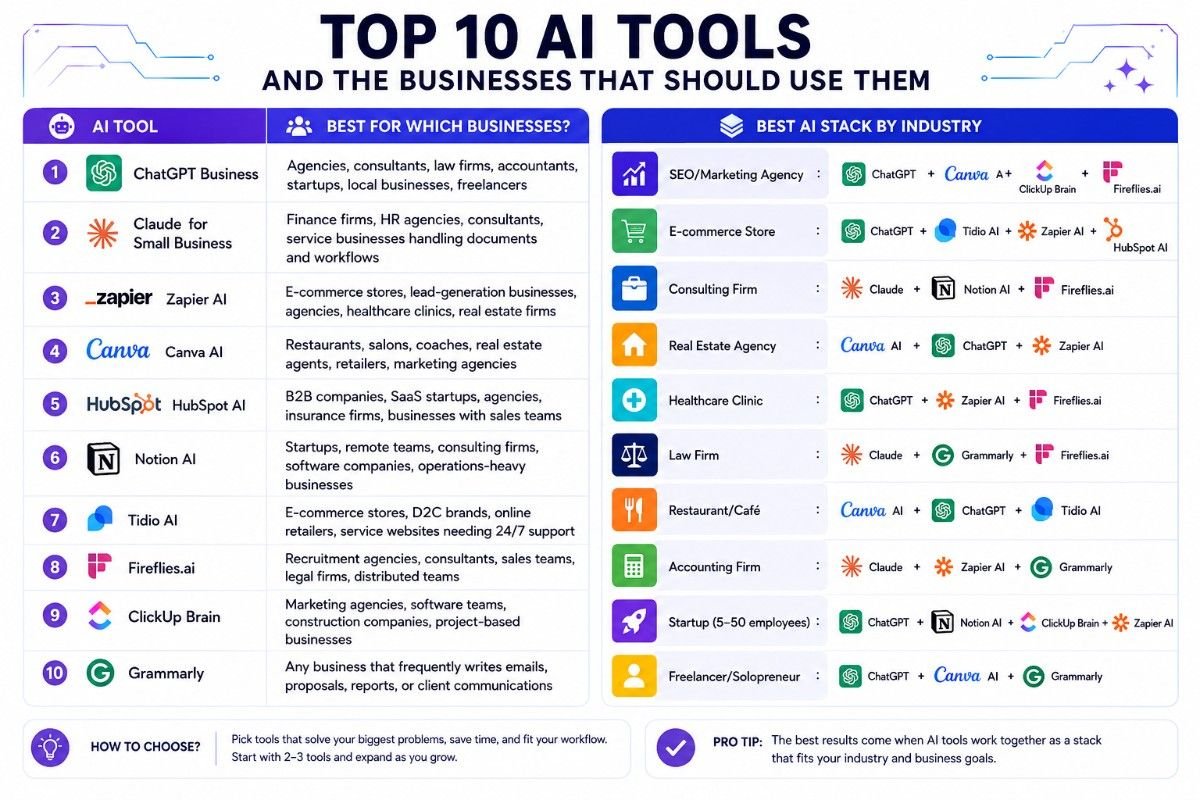
Best AI Stack by Industry
The right combination of tools depends on what your business actually does. Here’s a practical starting point by industry—treat it as a shortlist to research, not a prescription.
| Industry | Recommended Starting Stack |
|---|---|
| SEO / Marketing Agency | ChatGPT + Canva AI + ClickUp Brain + Fireflies.ai |
| E-commerce Store | ChatGPT + Tidio AI + Zapier AI + HubSpot AI |
| Consulting Firm | Claude + Notion AI + Fireflies.ai |
| Real Estate Agency | Canva AI + ChatGPT + Zapier AI |
| Healthcare Clinic | ChatGPT + Zapier AI + Fireflies.ai |
| Law Firm | Claude + Grammarly + Fireflies.ai |
| Restaurant / Café | Canva AI + ChatGPT + Tidio AI |
| Accounting Firm | Claude + Zapier AI + Grammarly |
| Startup (5–50 employees) | ChatGPT + Notion AI + ClickUp Brain + Zapier AI |
| Freelancer / Solopreneur | ChatGPT + Canva AI + Grammarly |
No two businesses are identical. These stacks suggest where to start—not what you’re locked into.
A 30-Day Plan to Actually Start Using AI
Knowing about tools is one thing. Working them into your daily routine without creating chaos is another. Here’s a realistic, low-pressure path.
Week 1: Choose One Problem
Don’t start with a tool. Start with the task that irritates you most — maybe it’s drafting social media captions every morning, answering the same five customer emails, or manually typing invoice details. Pick a single, repetitive pain point. That’s your target.
Week 2: Test One Tool
Sign up for a free trial or free plan of the tool that addresses that problem. Use it for real work, not an imaginary test. For example, if you chose Grammarly, run every outgoing email through it for a week. Note how much time you spend correcting things before and after. Resist the urge to test three tools at once; you’ll just overwhelm yourself.
Week 3: Train One Team Member
Hand the tool to someone else on your team — maybe the office manager or a part-time assistant. Write down three bullet points explaining what the tool does and when to use it. Keep it simple. Ask for their honest feedback: what’s clunky, what’s helpful, what they’d change. That feedback guides whether you keep the tool or drop it.
Week 4: Measure Results
Look back over the month. Ask yourself a few practical questions:
If the answer to the last question is no, cancel the subscription. A tool you don’t use isn’t a bargain at any price.
Did this save us measurable time? (Even 30 minutes a week counts.)
Did it reduce mistakes or customer complaints?
Was it simple enough that we’ll actually keep using it next month?
Frequently Asked Questions
Is my business data safe when using AI tools?
It depends on the tool and what you share with it. Most reputable platforms publish clear privacy policies explaining how your data is stored and whether it’s used to train their models. Read those policies before entering any business information.
As a baseline: don’t paste customer payment details, sensitive personal data, or confidential legal records into any AI tool unless the vendor has explicitly addressed how that data is protected. When in doubt, describe the situation in general terms rather than pasting real sensitive content.
Do I need technical skills to use these tools?
For most tools on this list, no. If you can use Gmail and search the internet, you can use ChatGPT, Grammarly, Canva, and Fireflies.ai without needing help. Tools like Zapier and Notion have a moderate learning curve—building automations and organized workspaces takes some trial and error.
Expect to spend a few hours getting comfortable with any new tool. That’s true for any software. It’s not an AI-specific problem.
How much should a small business budget for AI each month?
A reasonable starting range is $50–150/month for a business using two or three tools. Many businesses get genuine value for $20–40/month by using one paid tool and free tiers of others.
Avoid stacking paid subscriptions before you’ve verified each one is actually being used and delivering results. Start with free plans. Upgrade only when you’ve consistently hit their limits.
Will AI replace my employees?
For small businesses, the realistic answer is: not in the way the question implies. Most business owners use AI to handle repetitive, low-judgment tasks—first drafts, meeting notes, routing basic customer questions—so that their existing staff can spend more time on work that requires human judgment, relationships, and expertise.
Some roles will evolve over time. But a 10-person business operates very differently from a large corporation, and staffing decisions are usually about trust, capability, and availability—not automation efficiency. For most small business owners, the real question is whether AI can help the team they already have get more done with less friction.
What information should I avoid sharing with AI tools?
Avoid entering the following into public AI platforms unless you’ve reviewed the vendor’s data policy carefully:
- Customer payment details, bank account numbers, or credit card information
- Social Security numbers or government-issued identification
- Medical records or protected health information
- Detailed confidential financials (proprietary pricing, sensitive P&L data)
- Legal documents containing privileged communications
- Employee personal data (salary information, performance records)
- Passwords, login credentials, or security keys
When you need help with a sensitive topic, describe the situation in general terms rather than sharing the actual document or data. That usually gets you the guidance you need without exposing anything confidential.
All pricing and feature information in this article reflects available data at time of writing and is subject to change. Confirm current details directly on each tool’s official website before making purchasing decisions.and is subject to change. Confirm current details directly on each tool’s official website before making purchasing decisions.
About Author – Azim Khan is a digital content creator and technology enthusiast specializing in AI tools, SEO, web hosting, cybersecurity, and online earning strategies. He focuses on creating practical, well-researched content that simplifies complex topics into actionable insights. His work is aimed at helping readers discover useful tools, improve their online presence, and make smarter decisions through reliable information and honest recommendations.